Example: A Perfume Batch
This worked example is for makers who blend and bottle perfume. For the general workflow, start with Your First Batch.
Record one complete journey: materials arrive, you make and bottle a perfume, then you ship some of those bottles and check their batch history.
Start with one scent and one bottle size. You can add the rest of your range once you’ve checked that this first batch matches your physical stock.
Before You Start
Section titled “Before You Start”- Open your brand’s workspace.
- Have your production recipe, material quantities, supplier lot numbers, and purchase prices to hand.
- Decide which unit you’ll use for each item. For example, weigh ingredients and
bulk perfume in
g, and count bottles and finished perfumes inea(each). - If you’re moving existing stock from CraftyBase, finish that import before entering the same stock through purchase receipts.
-
Add the items you buy and make.
In Inventory > Items, create an item for each material you track separately: fragrance concentrate or individual aromatic materials, perfumer’s alcohol, bottles, spray pumps, caps, labels, and cartons as applicable. Add your bulk perfume and finished bottle as separate items if you use the two-stage approach.
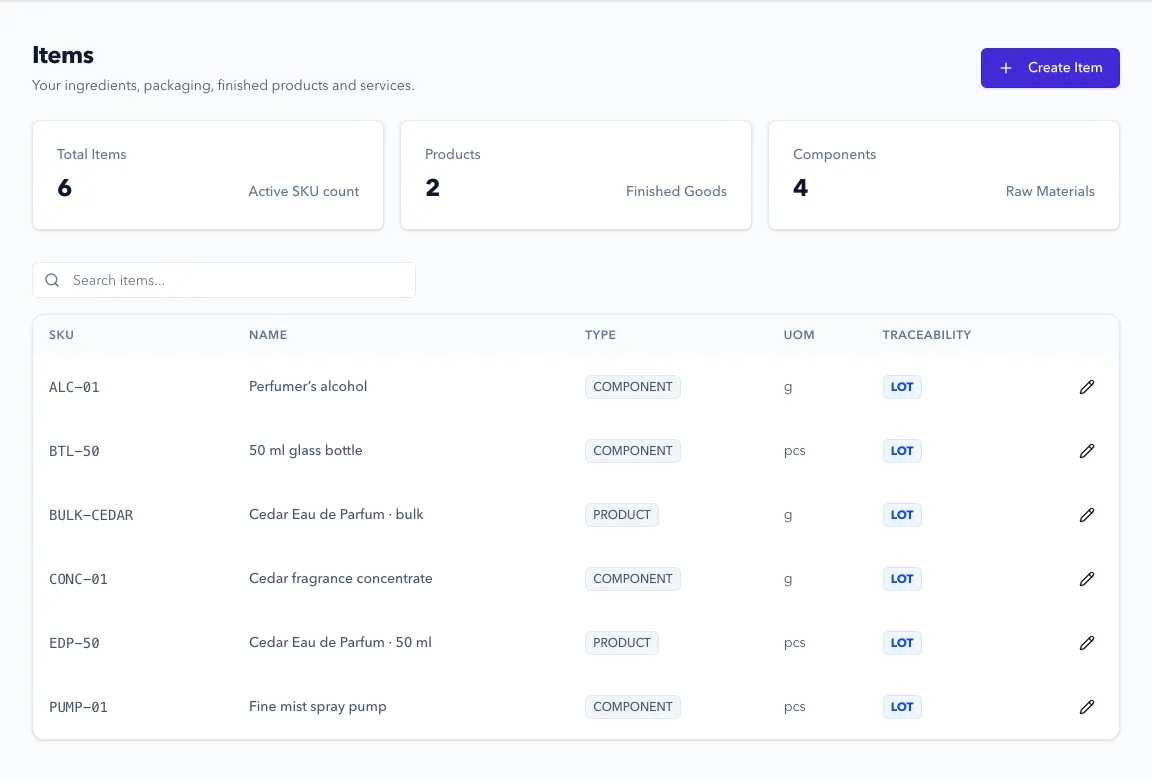
Use COMPONENT for purchased materials and packaging, and PRODUCT for the perfume you make. Use LOT traceability for materials and finished batches whose history you need to follow. See item setup for the field choices.
-
Choose where the stock lives, then receive your materials.
Create your storage locations in Inventory > Locations. Add suppliers in Purchasing > Vendors, then create and submit a purchase order in Purchasing > Orders. When the delivery arrives, use Receive Items to enter the quantity that actually arrived, its location, and the supplier’s lot number.
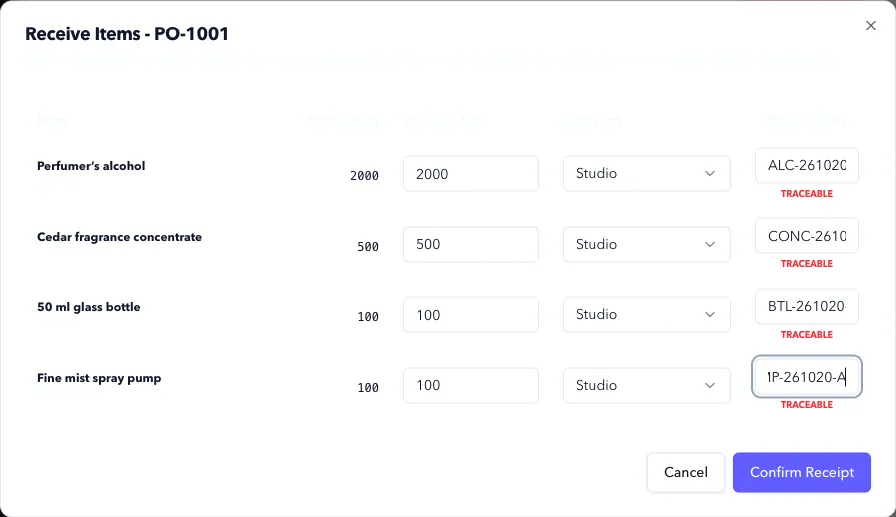
Ordering doesn’t add stock. Confirm Receipt does. Check the item’s unit before entering a quantity: a 1 kg delivery is
1000when that item is tracked ing. Follow the receiving guide. -
Create a recipe for the bulk perfume.
Open Manufacturing > Formulas (BOMs) > New BOM. A bill of materials (BOM) is the production recipe: what you consume and how much you expect to make. Choose your bulk perfume as the output and enter the ingredients for your usual batch size.
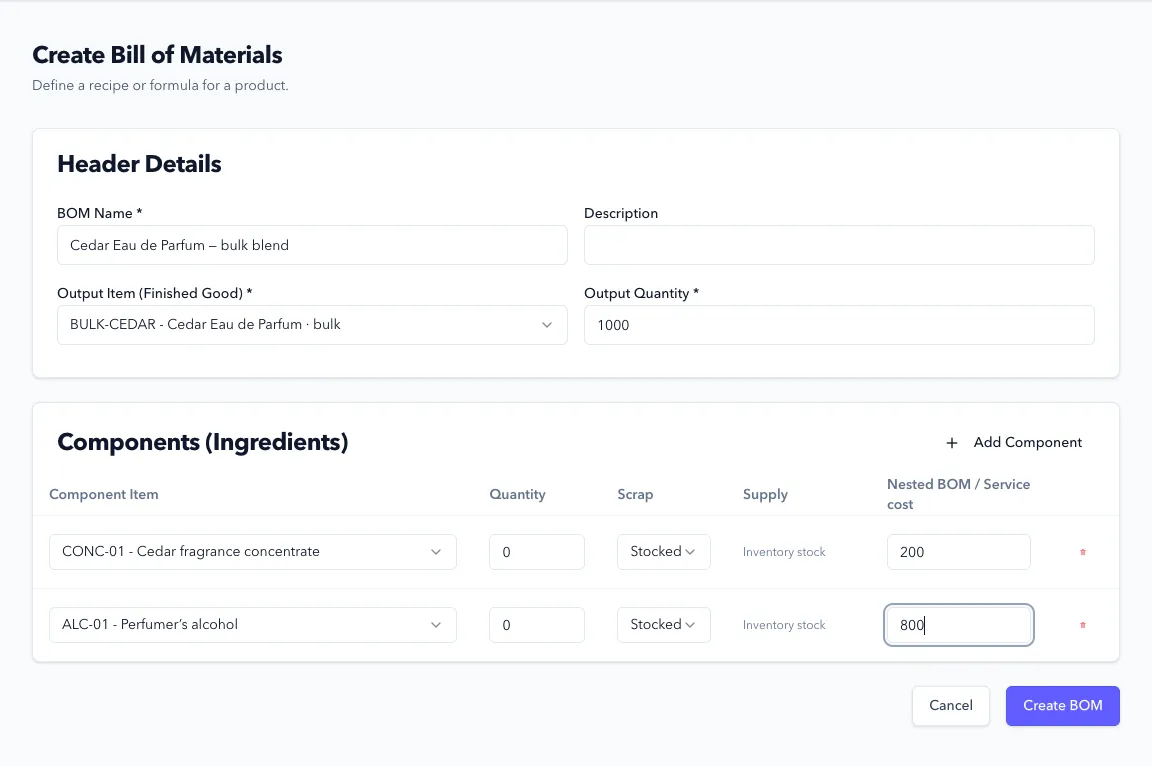
Use your established formula and measured quantities. Component quantities are amounts in each item’s own unit, rather than percentages. Formul scales them when you choose a different production quantity. Set up the recipe.
-
Record the blend you made.
Go to Manufacturing > Production > New Work Order. Choose the bulk perfume, recipe, production location, and target quantity. Use Plan Order, then Release Order to reserve materials. When the physical batch is ready to record, use Record Production and review the ingredient lots before saving.
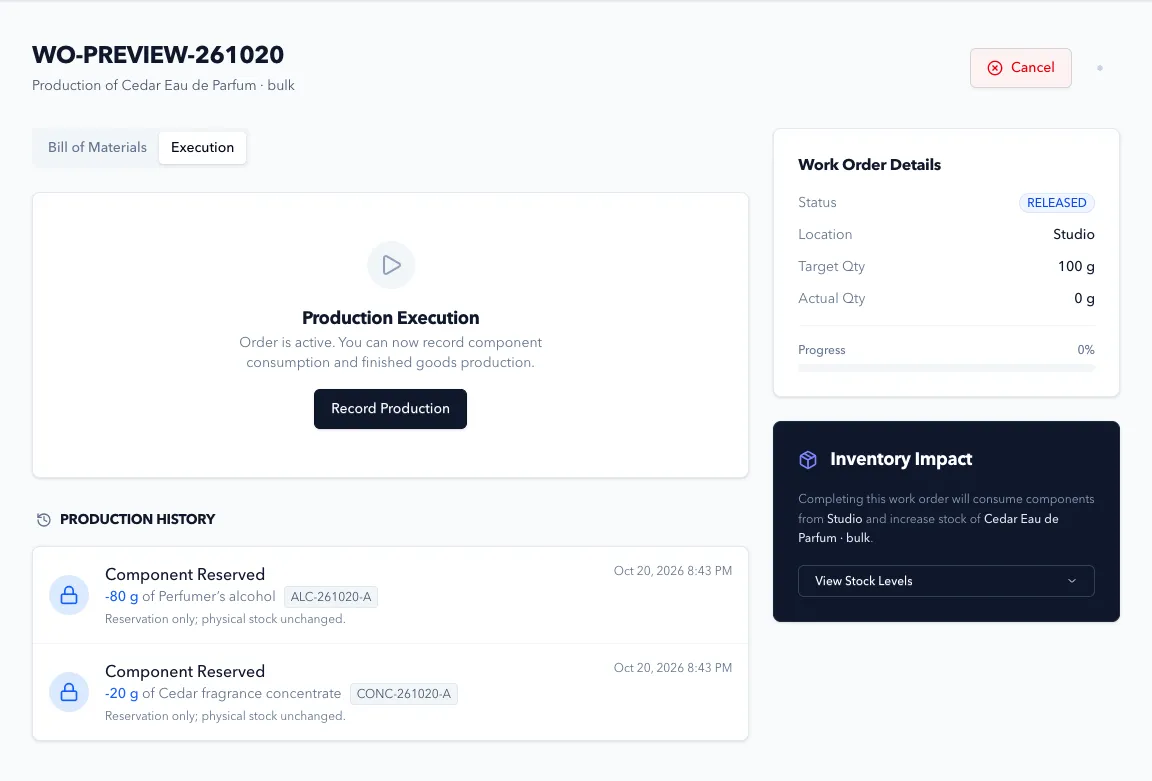
Give the output a batch code you can also put on your production record. Recording production removes the consumed ingredients and adds the bulk perfume to stock. Follow the work order guide for partial runs and shortages.
-
Bottle from that bulk batch.
Create a second recipe whose output is the finished bottle, counted in
ea. Include the measured amount of bulk perfume and the packaging you actually use. For 100 bottles, for example, you might need 100 bottles, 100 compatible spray pumps, 100 caps, and 100 labels. The bulk perfume quantity must come from your own fill measurements.Keep the bulk perfume line set to Stocked so this run consumes the batch you’ve already made. Create and complete a work order for bottling, selecting that bulk lot and assigning a finished batch code.
-
Reserve and ship finished bottles.
In Sales > Orders, create an order for the finished product. Use Allocate Inventory to reserve the right finished batch. Once the bottles are picked and packed, use Fulfill Order and Confirm Fulfillment.
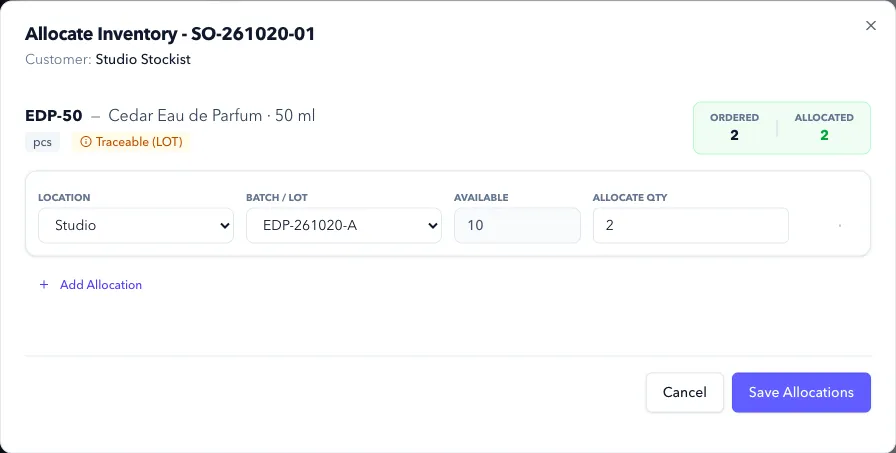
Allocation holds bottles for the order. Fulfillment removes them from on-hand stock. Follow sales orders and fulfillment for the full steps.
-
Check that you can follow the batch.
Open Reports > Traceability, search for the finished batch code, and inspect Inputs and Outputs. Follow the bulk batch back to its ingredient lots; check that the customer shipment appears against the finished batch.
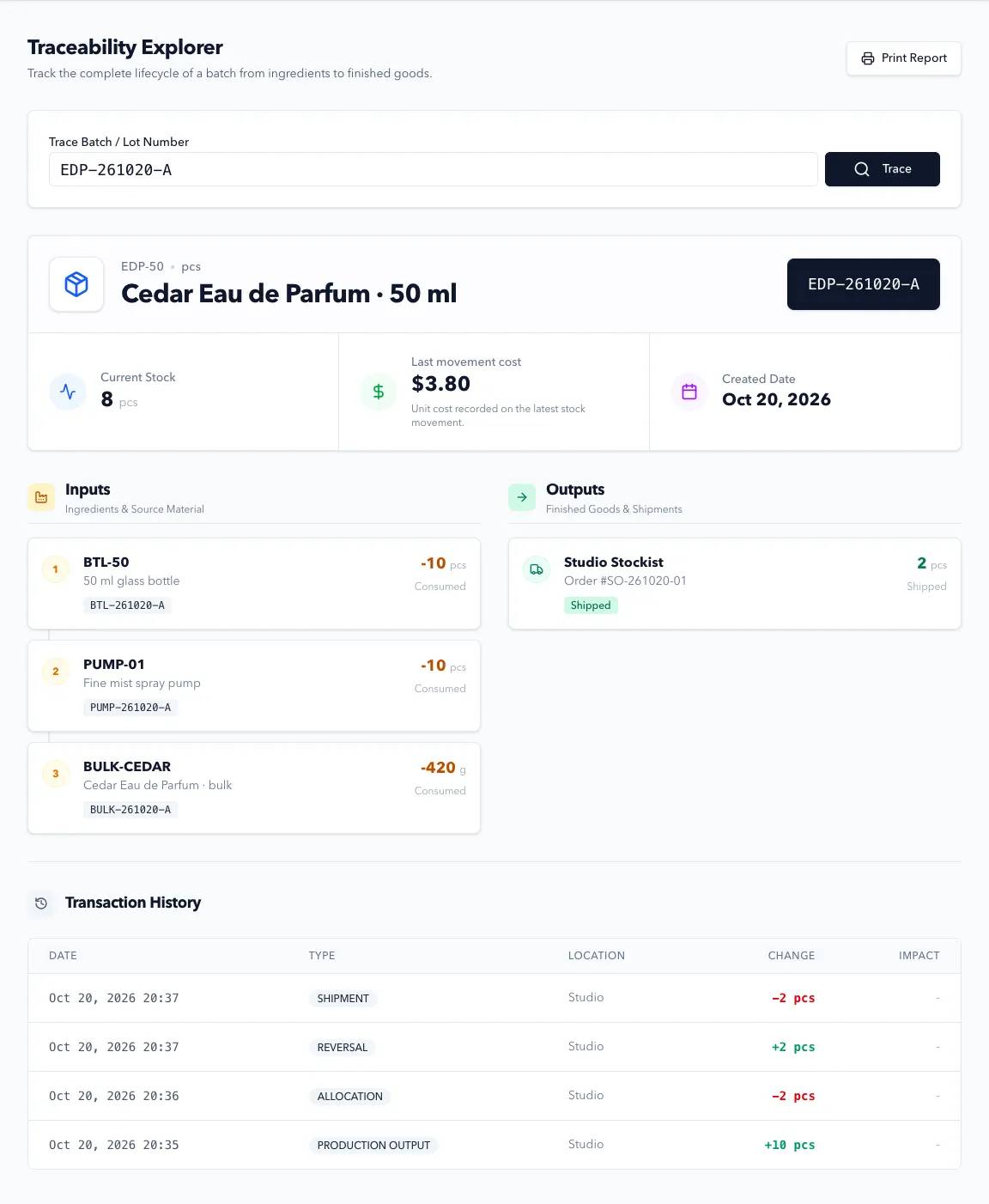
Compare the quantities left in Formul with the stock on your shelves. Use the traceability guide if links are missing.
Expected Result in Formul
Section titled “Expected Result in Formul”You have received materials, recorded the bulk and bottled batches, and shipped an order. Ingredients and packaging have decreased by the quantities recorded in production. Unused bulk and unsold bottles remain in stock. The finished batch links to the material lots you selected and the shipment you recorded.
| When you save | What changes |
|---|---|
| A purchase order | An order is created; stock stays the same |
| A receipt | Received stock increases |
| A released work order | Components are reserved; physical stock stays the same |
| Recorded production | Components decrease and the output batch increases |
| A sales allocation | Finished bottles are reserved; physical stock stays the same |
| A fulfilled sales order | Shipped bottles leave on-hand stock and their reservation clears |
Cancelling an unfulfilled sales order releases its reservations. Cancelling a work order before any production is recorded releases its material reservations; it doesn’t undo physical work. Closing a purchase order stops further receipts and doesn’t remove quantities already received.
If Something Looks Wrong
Section titled “If Something Looks Wrong”- There isn’t enough material to release production: check the location, unit, receipts, and reservations for other orders before changing quantities.
- The bottling run wants raw ingredients instead of bulk perfume: check that the bulk line uses Stocked, rather than Explode.
- A batch has no ingredient history: check that you selected ingredient lots when recording production. Imported opening balances don’t contain the original production history; keep your source records.
- Stock doesn’t match the shelf: review transaction history and check for a duplicate receipt or an unrecorded production run.
Next Step
Section titled “Next Step”Add your next perfume or bottle size using the same pattern. When your catalog and stock are ready, connect Shopify.