Create a Production Recipe
Save the materials and packaging needed for a repeatable batch. In Formul, this recipe is called a bill of materials, or BOM.
Before You Start
Section titled “Before You Start”- Item records for the product you make and each material or packaging part it uses.
- Your tested formula and normal batch size.
- Consistent units: each component quantity must use that component item’s stock unit.
-
Navigate to Manufacturing > Formulas (BOMs).
-
Click New BOM.
-
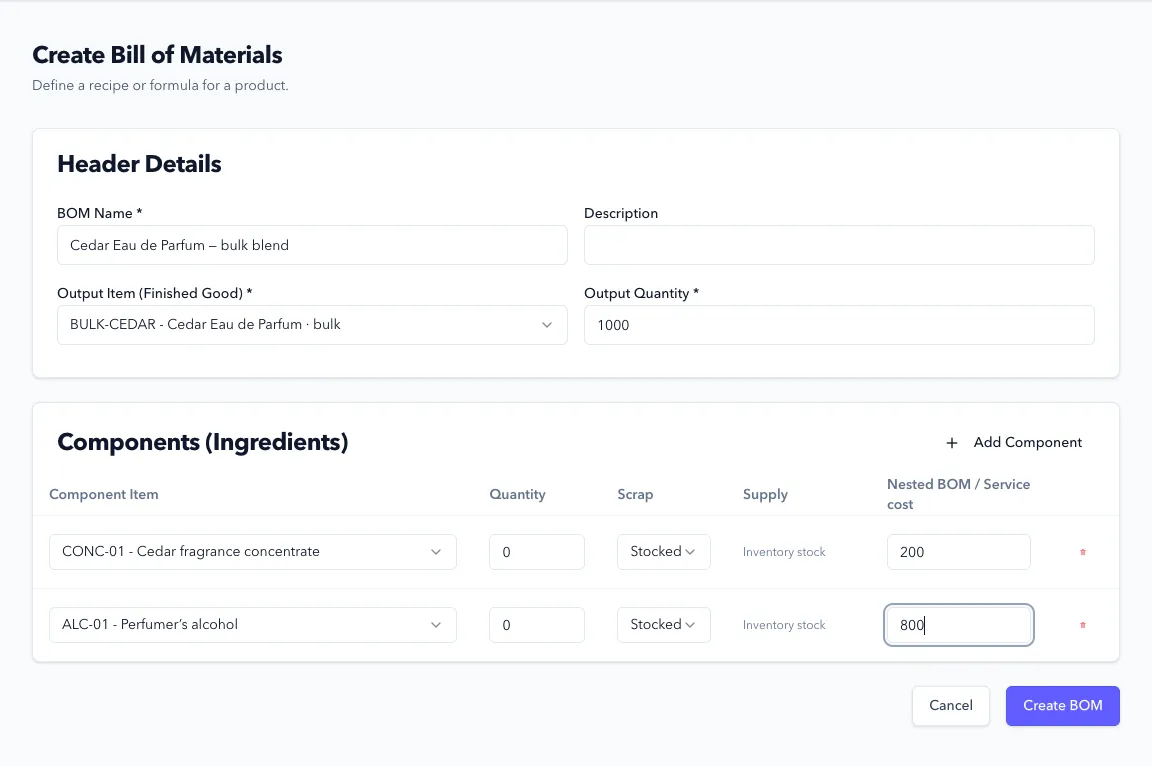
Enter BOM Name, such as Standard batch, and select Output Item (Finished Good). This is the stock item that production will create.
-
Enter Output Quantity for a normal batch, in the output item’s unit. For a bulk product tracked in grams, this is the expected weight of the batch. For a finished product tracked in each, this is the number of units.
-
Under Components (Ingredients), select the first input and its Quantity. Use Add Component for the remaining materials or packaging. Enter amounts in each component’s unit, rather than formula percentages.
-
Review Supply for each physical component:
- Stocked consumes that item’s existing inventory. Use it for purchased materials, packaging, and an intermediate product you’ve already made.
- Explode uses the selected Nested BOM to calculate that component’s underlying materials instead. It doesn’t consume a previously recorded intermediate batch.
-
Leave Scrap at
0unless you’ve deliberately allowed for extra material in the recipe. For a stocked component, the value is a decimal allowance:0.02adds 2% to its requirement. Check this carefully before using the recipe in production. -
Click Create BOM.
Expected Result in Formul
Section titled “Expected Result in Formul”- The recipe appears under Manufacturing > Formulas (BOMs) and is available when creating a work order for its output item.
- Creating the recipe doesn’t reserve or consume any stock.
- Work order quantities scale the recipe. If a recipe makes 100 bottles, an order for 50 bottles requires half its component quantities, including any scrap allowance.
Production in More Than One Stage
Section titled “Production in More Than One Stage”If you make a bulk or intermediate product and package it later, give each stage its own recipe:
| Recipe | Output | Inputs |
|---|---|---|
| Intermediate batch | Bulk product, in its stock unit | Raw materials used in that stage |
| Packaging | Finished product, in each | Measured intermediate product, containers, closures, labels, and cartons as used |
On the packaging recipe, keep the intermediate product set to Stocked. That preserves the separate production record and consumes the intermediate lot you select. Choosing Explode would calculate underlying material requirements instead.
If Something Looks Wrong
Section titled “If Something Looks Wrong”- The output or an input isn’t listed: create its item record first.
- Requirements look too high or low: check the output quantity, each item’s unit, and the scrap allowance. Milliliters and grams aren’t interchangeable; Formul doesn’t make that conversion for you.
- A component is rejected: check for duplicate lines, zero quantities, or a nested recipe that refers back to itself.
Next Step
Section titled “Next Step”Execute production in Work Orders.